Mysti AI Coding Team
Orchestrate coding agents in VS Code to work independently, debate alternatives, and synthesize solutions.
- Source repo
- DeepMyst/Mysti
- Stars
- ★ 1.1k
- Last updated
- 5d ago
- License
- Apache-2.0
- Primary language
- TypeScript
- FA score
- 58/100 · Major gaps
At a glance
- How it runs
- Works with
- Universal · cross-platformCodex · Claude Code · OpenAI API · Claude API
- Cost
- Free software; you pay for model usage
- Setup effort
- Medium · a few setup steps
- You'll need
- Typical use
- A technical lead weighing architecture trade-offs can pair two providers under Debate or Delphi and receive a synthesized recommendation.
- Not a fit if
- Developers who do not use Visual Studio Code; Mysti has no standalone CLI or other editor build
- Users who want zero setup and dislike installing and authenticating a separate AI CLI per provider
- Source review
- 58/100 · Major gaps 1 safety controls not found
What does this agent do, and when should you use it?
Mysti is a VS Code extension that connects its chat sidebar or editor tab to Claude Code, Codex, Gemini, GitHub Copilot, Cline, Cursor, OpenClaw, Manus, OpenCode, Qwen Code, Ollama, and LocalAI. A user can delegate work to one provider or select two agents for Brainstorm Mode using the quick, debate, red-team, perspectives, or delphi strategy. It supports file context, agent @-mentions, chained tasks, conversation history, implementation-plan detection, and per-panel context compaction. Autonomous Mode adds safety classification, three safety modes, learned permission preferences, continuation modes, and an audit trail, while file access can be read-only, approval-based, or unrestricted. Its deployment boundary is the local VS Code extension and the provider CLIs it invokes; cloud models require their respective accounts or APIs, while Ollama and LocalAI provide local or self-hosted options.
The user submits a request through Mysti's chat interface and can attach transient file context with @filename or route work with agent mentions such as @claude and @codex. The extension invokes an installed provider CLI, streams its response, and passes earlier agents' responses to later agents in a chained request. Brainstorm Mode coordinates two configured agents for multiple rounds under the quick, debate, red-team, perspectives, or delphi strategy; it tracks agreement and position stability and can stop early after convergence. The interface renders Markdown, syntax highlighting, Mermaid diagrams, and live task progress, and it can identify multiple implementation approaches for the user to choose from. When context use approaches the default 75% threshold, Claude Code uses its native /compact command while other providers receive client-side message summarization. Depending on access and autonomous settings, an agent can inspect files only, ask before changes, or work independently under configurable safety controls.
- A technical lead weighing architecture trade-offs can pair two providers under Debate or Delphi and receive a synthesized recommendation.
- A developer conducting a security review can combine the Red-Team strategy with the Security-Minded persona to challenge assumptions and expose edge cases.
- A team that needs human control over edits can select read-only or approval-based access while attaching only the relevant files through @-mentions.
- A VS Code user already paying for Claude, OpenAI, Gemini, GitHub Copilot, or another supported service can reuse the corresponding CLI and credentials instead of committing to one provider.
- A developer handling a long refactor or task queue can combine Autonomous Mode, progress tracking, conversation history, and context compaction.
- An individual or organization with code-privacy requirements can use Ollama or LocalAI for local or self-hosted inference.
How do you install or deploy this agent?
In VS Code, press Ctrl+P (Cmd+P on macOS) and run ext install DeepMyst.mysti, or install DeepMyst.mysti from the VS Code Marketplace. Install and authenticate at least one supported CLI. For example, install Claude Code with npm install -g @anthropic-ai/claude-code and run claude auth login; install Gemini with npm install -g @google/gemini-cli and run gemini auth login; install OpenCode with npm i -g opencode-ai@latest and run opencode auth login; or install Qwen Code with npm install -g @qwen-code/qwen-code@latest, run qwen, and enter /auth. GitHub Copilot CLI can be installed with npm install -g @github/copilot-cli; then run copilot and use /login. Brainstorm Mode requires any two supported CLIs. Ollama and LocalAI are documented as local options without a cloud subscription, but their installation is delegated to ollama.com and localai.io.
How do you use this agent?
Open Mysti from the VS Code Activity Bar or press Ctrl+Shift+M (Cmd+Shift+M on macOS). Enter a coding request to use the default provider. A message such as @src/auth.ts @gemini Suggest performance improvements for this file selects both a file and an agent, while @claude Write tests, then @codex optimize them chains providers. Configure the default and executable paths with settings such as mysti.defaultProvider and mysti.codexPath, and select file permissions through mysti.accessLevel. For two-agent work, set mysti.brainstorm.agents to two installed providers and choose quick, debate, red-team, perspectives, or delphi through mysti.brainstorm.strategy; mysti.brainstorm.autoConverge controls early termination after consensus.
What are this agent's strengths and limitations?
- Supports 12 cloud, local, and self-hosted providers, with one-click switching and arbitrary two-provider Brainstorm teams.
- Five collaboration strategies cover direct synthesis, adversarial review, security challenge, contrasting perspectives, and consensus refinement rather than merely producing two parallel answers.
- Provides read-only, approval-based, and full file access alongside autonomous safety classification, audit logs, and custom block patterns.
- Combines file mentions, explicit agent routing, and cross-agent task chaining in which later agents receive earlier responses.
- Includes automatic context compaction, conversation history, live task progress, 16 developer personas, and 12 toggleable behavioral skills.
- The primary interface depends on Visual Studio Code; the source does not document Mysti as a standalone CLI, embeddable library, or native extension for other editors.
- Each provider requires its own CLI and may require a subscription, API credentials, or account authentication; Brainstorm Mode requires at least two CLIs.
- Provider behavior is not fully uniform: Claude Code uses native
/compact, while other providers rely on client-side summarization. - Full-access and autonomous operation can modify files, so adopters must choose permission and safety modes appropriate to their risk tolerance.
- Documented fixes for Windows process spawning, authentication checks, silence-based timeouts, convergence guards, and retry cleanup show that coordinating external CLIs introduces operational failure modes.
How does this agent compare with similar options?
Compared with the README's characterization of single-AI Copilot or Cursor workflows, Mysti differentiates itself by switching among 12 providers and pairing any two under five collaboration strategies. It also adds explicit file-permission levels, 16 developer personas, autonomous operation, and cross-agent @-routing. Because GitHub Copilot and Cursor are themselves supported providers, Mysti is best understood as a VS Code orchestration layer above those tools rather than a proprietary model replacing them.
Key facts side by side with the most closely related agents.
| Agent | Source review | Form / cost | Stars | Updated | Language | Full support on |
|---|---|---|---|---|---|---|
| Mysti AI Coding Team This agent | 58 · Major gaps | IDE extensionFree + model costs | ★ 1.1k | 5d ago | TypeScript | Codex · Claude Code · OpenAI API · Claude API |
| Aura IDE | 77 · Good | Desktop appFree + model costs | ★ 57 | 1mo ago | Python | OpenAI API · Claude API |
| Agent Teams AI | 51 · Major gaps | Desktop appFree + model costs | ★ 2.3k | today | TypeScript | Codex · Claude Code |
| Plannotator | 78 · Good | CLIFreemium | ★ 9.5k | today | TypeScript | Codex · Claude Code |
How does FollowAgents rate this agent?
Why each dimension lost points
The default asks before edits and the product exposes read-only, ask-permission, and full-access levels; autonomous-mode safety classes, block patterns, audit logging, and active-child protection provide meaningful least-privilege, confirmation, and external-effect controls. Full-access and aggressive autonomy can nevertheless authorize broad actions. The README identifies file context, external CLIs/local endpoints, telemetry categories, and an opt-out, but does not provide a per-provider destination map, retention policy, or complete network inventory. Cursor and LocalAI keys can be placed directly in ordinary VS Code settings, while no SecretStorage, redaction, or log-leak controls are evidenced, so sensitive-data handling is thin. No lockfile evidence, vulnerability scanning, dependency policy, or supply-chain controls are supplied, yielding zero for dependency security. No file-change undo, snapshot, or recovery procedure is shown, so rollback is weak. Repository, author, company, contributors, and licensing are attributed, but publisher identity remains unverified and the attribution evidence is not exhaustive.
The provider matrix, configuration, README, and test helpers show design attention to provider status, missing or unauthenticated tools, timeouts, hanging streams, thrown errors, and cancellation. Material inconsistencies reduce self-consistency: the README announces v0.3.4 while package.json is 0.4.0; the documented default maximum discussion rounds is 3 while the manifest says 2; the README example uses mysti.claudePath while the manifest defines mysti.claudeCodePath; and provider counts alternate between 10 and 11. Installation prerequisites and CLI commands are extensive, but operation depends on external CLIs, accounts, authentication, daemons, or local services. Test doubles can simulate failures, yet no production error copy or concrete user recovery flow is provided, so failure messaging receives only thin credit.
Documentation thoroughly addresses single-agent work, two-agent brainstorming, security review, architecture decisions, local privacy, developer personas, and five collaboration strategies. Permission modes, the two-agent constraint, round limits, compaction, and provider prerequisites establish useful boundaries, but unsupported tasks and model-quality limits are not clearly stated. Mentions, commands, menus, and an explicit brainstorm toggle make routing reasonably precise; however, activation on startup and numerous workspace-file patterns are broad. VS Code compatibility, cross-platform shortcuts, executable paths, local endpoints, timeouts, and model controls support environment fit, though several setup paths are npm/Unix-oriented and compatibility with every external tool is not demonstrated by the supplied source.
The README has strong navigation, feature sections, configuration tables, and a dedicated-document index, while Marketplace installation, CLI setup, authentication, and quick-start instructions are detailed. Apache-2.0 metadata matches the complete license file, justifying full license credit. Naming and release stability lose substantial credit because of claudePath versus claudeCodePath, v0.3.4 versus 0.4.0, conflicting round defaults, and inconsistent provider counts. Examples are plentiful, but there is no actual FAQ or systematic troubleshooting section. External CLI, subscription, and two-CLI requirements are disclosed, while known safety limits and a compatibility matrix are sparse. Author, company, issue tracker, and contribution routes identify maintainers, but no support lifecycle, release owner, or security-reporting route is shown. The “what’s new” section is not a complete changelog aligned to the current package version.
The source describes a usable chat surface with Markdown/Mermaid rendering, task progress, plan selection, context management, agent routing, and synthesized answers; test factories also expose structured brainstorm and mention streams. This supports ordinary output usability and a plausible marginal benefit from contrasting agents. However, the supplied evidence is mostly product documentation and test scaffolding, with neither core implementation nor representative textual outputs proving that synthesis is actually better than one agent. Auto-convergence, round caps, local models, compaction, and token settings can control cost, but two-agent workflows inherently increase latency and model use, while “no additional cost” and “zero latency” claims omit API, subscription, and hardware qualifications. Cost-benefit is therefore adequate rather than thorough.
The manifest and test helpers make some concrete claims traceable, including provider enumeration, permission defaults, strategies, rounds, timeouts, and simulated failure states. Core claims about safety classification, audit logging, telemetry behavior, convergence, and superior results lack corresponding implementation evidence in the supplied files, limiting traceability. README and package.json corroborate several features but conflict over versions, setting names, round defaults, and provider counts, weakening cross-source support. Marketing conclusions such as “superior solutions,” “complete privacy,” “zero latency,” and never losing work are not clearly separated from verified facts or qualifications, so fact/inference separation is thin.
- Not found in source: dependency securityPin versions and run a dependency audit (npm audit, pip-audit) before installing; prefer running it in a container.
- Before placing Cursor or LocalAI keys in ordinary VS Code settings, verify storage, settings-sync, log-redaction, and SecretStorage behavior; the supplied source does not establish those protections.
- Full-access and aggressive autonomous modes may let external CLIs edit files or execute commands. Start with read-only or per-change confirmation and work in a recoverable version-controlled workspace.
- README and package.json conflict on the release version, Claude setting key, default discussion rounds, and provider count. Confirm behavior against the installed manifest and version-matched documentation.
- The telemetry assurances appear only in the README; no implementation, event-field inventory, retention period, or receiver details are supplied. Disable telemetry and inspect network behavior for sensitive projects.
- Multi-agent operation may more than double model calls, latency, and expense. Claims of no additional cost, zero latency, and improved quality are not verified by the supplied evidence.
- No dependency-security controls, file-change rollback mechanism, or production recovery flow are evidenced. Review dependencies in isolation and ensure commits, backups, or snapshots are available.
Recent releases
Latest entries from the project's GitHub Releases. Notes are quoted from upstream as written, not rewritten or tested by FollowAgents.
-
Release notes excerpt
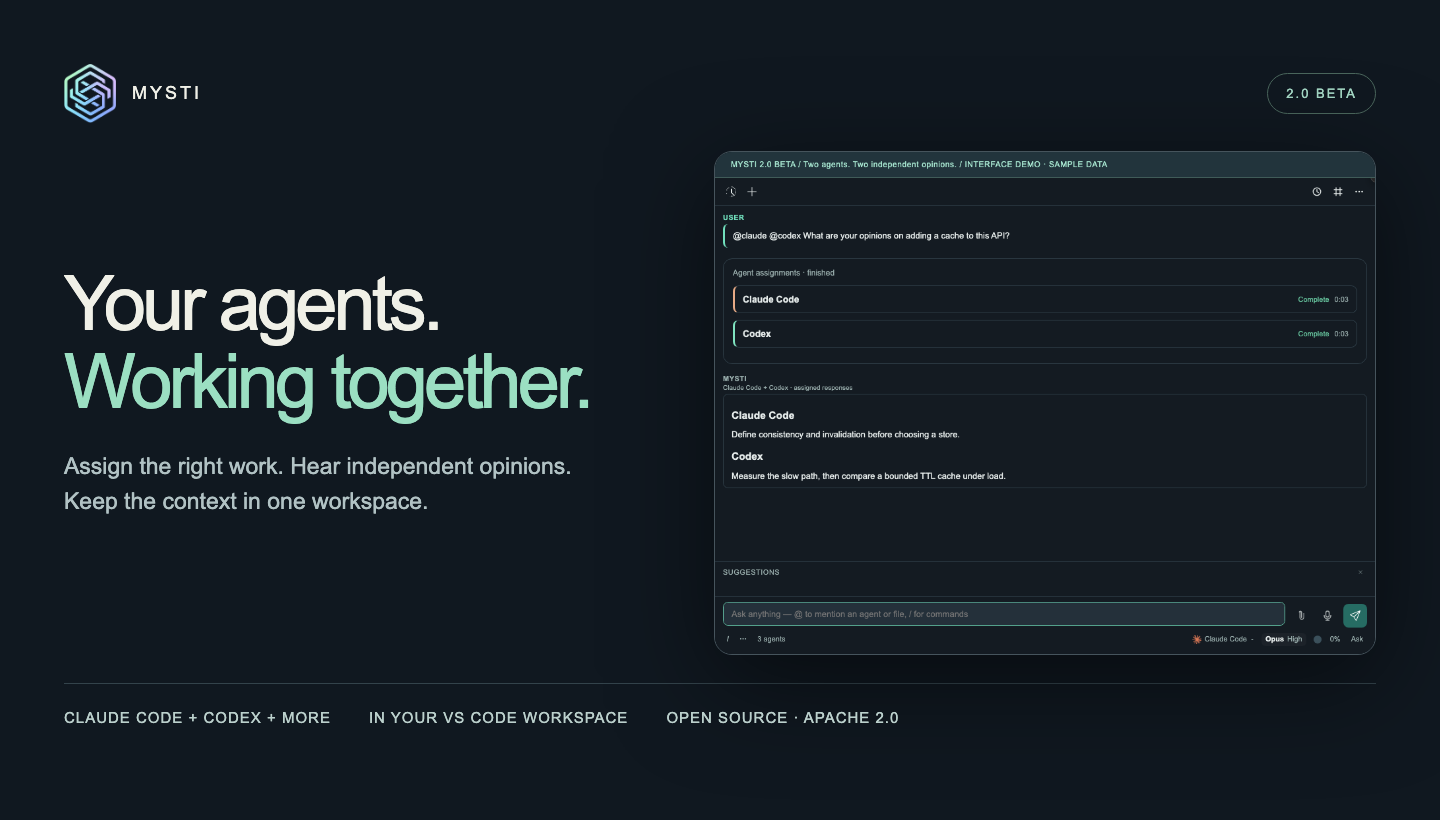 Your agents. Working together. Mysti 2.0 BETA brings independent opinions, explicit agent assignments, connected tools, and proactive project context into one VS Code workspace. …View on GitHub ↗ -
Release notes excerpt
What's New 4 New Providers (12 Total) - OpenCode: Multi-backend agent (Anthropic, OpenAI, Google, Groq) — closes #25 - Qwen Code: Alibaba's AI coding CLI with deep reasoning - Ollama: Local LLM inference, privacy-first — closes #24 - LocalAI: Self-hosted AI models — closes #24 18 Brainstorm & @-Mention Stability Fixes - Silence-based timeout — agents aborted after 90s of no output (no more infinite waits) - Auth pre-check — validates provider authentication before brainstorm starts …View on GitHub ↗ -
Release notes excerpt
Mysti v0.3.1 What's New in v0.3.0 / v0.3.1 This is the first published GitHub release for Mysti — covering all features through v0.3.1. 3 New Providers (7 total) - Cursor — Full integration with Cursor's headless AI agent CLI (6 models including Claude Sonnet 4, GPT-5, o3) - OpenClaw — Dual-transport provider with WebSocket Gateway and CLI fallback - Manus (Experimental) — HTTP API-based provider for Manus AI Autonomous Mode …View on GitHub ↗
FAQ
Do I need to buy another model subscription for Mysti?
Can I use it with only one AI CLI installed?
Can Mysti change files without approval?
mysti.accessLevel: it can be read-only, ask before each change, or have full access. Autonomous Mode further offers conservative, balanced, and aggressive safety modes plus custom patterns that are always blocked.What telemetry does it collect?
What happens when a long conversation approaches the context limit?
/compact command, while other providers use client-side message summarization.