WeChat Bot Multi-IM Assistant
Route WeChat, Lark, Telegram, and WhatsApp messages to selectable AI reply services.
- Source repo
- wangrongding/wechat-bot
- Stars
- ★ 12k
- Last updated
- 2mo ago
- License
- MIT
- Primary language
- JavaScript
- FA score
- 64/100 · Some gaps
At a glance
- How it runs
- Works with
- Universal · cross-platformChatGPT · OpenAI API · Claude API
- Cost
- Free software; you pay for model usage
- Setup effort
- Medium · a few setup steps
- You'll need
- Typical use
- An individual who wants automatic answers only for approved WeChat contacts or when the bot is mentioned in an approved group.
- Not a fit if
- Users who cannot accept WeChat warning or ban risk
- WhatsApp users unwilling to expose a public HTTPS webhook endpoint
- Source review
- 64/100 · Some gaps 2 safety controls not found
What does this agent do, and when should you use it?
WeChat Bot is a self-hosted IM auto-reply and conversation-analysis project built around Wechaty, with a unified wb command-line interface. It receives messages through WeChat QR-code sessions, Lark event streams, Telegram Bot API long polling, or WhatsApp Cloud API webhooks, then passes them to Pi, ChatGPT, DeepSeek, Ollama, Claude, Kimi, and other configured services for single-turn replies. Through OpenCLI wx-cli, it can also read local WeChat sessions, contacts, group members, favorites, and cached Moments data for statistics or deeper analysis of a group or friend. WeChat messages can be stored in .data/wechat/messages.jsonl, while allowlists, mentions, and prefixes constrain which conversations trigger replies. It fits users prepared to operate a Node.js service and manage platform credentials, but its WeChat Web protocol carries an expressly documented warning and account-ban risk.
The inbound path depends on the channel: Wechaty handles WeChat QR-code login and text messages; Lark events are consumed with lark-cli event consume im.message.receive_v1 --as bot; Telegram uses official Bot API long polling; and WhatsApp runs a Cloud API webhook reachable by Meta. wb agent --im <wechat|lark|telegram|whatsapp> --agent pi sends messages to Pi, while wb start --serve <service> invokes a configured provider such as ChatGPT, DeepSeek, Ollama, Claude, Kimi, Dify, Doubao, or Tongyi and returns the result to the originating IM channel. WeChat traffic can be appended to local JSONL files, and commands including wb wx sessions, history, contacts, members, favorites, and sns-feed query local cache through wx-cli. wb analyze --room and wb analyze --friend produce either local-only statistics or deep analysis by sending recent samples to the selected service. In-chat /stats and /analyze commands are restricted to allowlisted contacts and rooms by default.
- An individual who wants automatic answers only for approved WeChat contacts or when the bot is mentioned in an approved group.
- A developer who wants to expose one Pi project agent through WeChat, Lark, Telegram, and WhatsApp.
- A user who needs to inspect local WeChat group activity, members, or recent conversations with a particular friend.
- A privacy-conscious user who wants
--stats-onlyanalysis of local JSONL messages without invoking an AI provider. - A team that needs to read, search, and send Lark messages and generate replies from
im.message.receive_v1events. - A self-hoster who wants to switch between local Ollama and cloud services such as OpenAI, Claude, DeepSeek, or Kimi.
How do you install or deploy this agent?
Install Node.js 18 or later; an LTS release is recommended. Run:
npm i
cp .env.example .env
npm linkAt minimum, set BOT_NAME, ALIAS_WHITELIST, ROOM_WHITELIST, WECHAT_STORE_MESSAGES='true', PI_BIN='pi', and PI_AGENT_ARGS='--print --no-session' in .env. If no global pi executable is installed, leave PI_BIN empty and the project will use npx --yes @earendil-works/pi-coding-agent. Cloud providers require their own credentials, such as OPENAI_API_KEY, CLAUDE_API_KEY, or DEEPSEEK_FREE_TOKEN; Telegram and WhatsApp likewise require a bot token or Cloud API credentials. The first WeChat invocation is wb agent --im wechat --agent pi, followed by scanning the terminal QR code. Docker is also documented: run docker build . -t wechat-bot, then docker run -d --rm --name wechat-bot -v $(pwd)/.env:/app/.env wechat-bot.
How do you use this agent?
Start WeChat with Pi using wb agent --im wechat --agent pi, or select a conventional reply backend with wb start --serve ollama, wb start --serve ChatGPT, or wb start --serve deepseek. A private sender must match ALIAS_WHITELIST; a group must match ROOM_WHITELIST and mention BOT_NAME. AUTO_REPLY_PREFIX can add another trigger condition. For local data, run wb wx init, then commands such as wb wx sessions, wb wx history, wb wx members, or wb wx sns-search. Analysis examples are wb analyze --room "Group name" --stats-only and wb analyze --friend "Friend alias" --serve ollama. Start the other channels with wb agent --im lark --agent pi, wb agent --im telegram --agent pi, or wb agent --im whatsapp --agent pi; WhatsApp additionally requires configuring https://your-public-domain.example/webhook/whatsapp as the Meta webhook. Validate the analysis module and CLI with npm run test:analysis and node ./cli.js --help.
What are this agent's strengths and limitations?
- One
wbCLI covers WeChat, Lark, Telegram, and WhatsApp with channel-specific receive, send, and event-processing commands. - The reply layer is not tied to one provider: documented choices include Pi, ChatGPT, DeepSeek, Ollama, Claude, Kimi, and Dify.
- Its
wx-cliintegration goes beyond replies by exposing local WeChat sessions, contacts, group members, favorites, and cached Moments. --stats-onlyprovides a local analysis path that neither requires an LLM nor calls an AI service for the statistics.- Allowlists, group mentions, and optional reply prefixes provide explicit controls over when automation activates.
- The default WeChat Web protocol may cause warnings or account bans, and the documentation describes Wechaty and padlocal maintenance concerns.
- Deployment involves Node.js,
.envconfiguration, channel credentials, and several external CLIs; authorization differs across IM platforms. - WhatsApp inbound operation requires a public HTTPS endpoint that Meta can reach, adding infrastructure beyond a closed local process.
- Non-text WeChat messages do not enter the automatic reply pipeline, and WhatsApp replies are limited to inbound text by default.
- Deep analysis through a cloud provider sends recent message samples outside the local machine, creating privacy and service-cost considerations.
How does this agent compare with similar options?
Pi mode uses Pi as a common project agent across all four IM channels and defaults to single-turn, non-interactive replies. The --serve path instead selects a direct backend such as ChatGPT, DeepSeek, Ollama, or Claude. Ollama offers a documented local-service option, while OpenAI, Claude, Kimi, and other cloud integrations require credentials, available balance, and network access. Unlike those generative paths, --stats-only reads local data and produces statistics without calling an AI service.
Key facts side by side with the most closely related agents.
| Agent | Source review | Form / cost | Stars | Updated | Language | Full support on |
|---|---|---|---|---|---|---|
| WeChat Bot Multi-IM Assistant This agent | 64 · Some gaps | CLIFree + model costs | ★ 12k | 2mo ago | JavaScript | ChatGPT · OpenAI API · Claude API |
| GoClaw Multi-Tenant Agent Gateway | 48 · Major gaps | Self-hosted serviceFree + model costs | ★ 3.7k | today | Go | Codex · OpenAI API · Claude API |
| Browser Use Box | 34 · Major gaps | — | ★ 460 | 2mo ago | Python | Claude Code · Claude API |
| Agent Barn | 55 · Major gaps | Self-hosted serviceFree + model costs | ★ 111 | 1d ago | Python | — |
How does FollowAgents rate this agent?
Why each dimension lost points
Most automatic replies are constrained by contact, room, mention, or prefix rules, and the README clearly describes local JSONL capture and when recent samples are sent to an AI service. Least privilege is nevertheless incomplete because Lark and Telegram private chats reply by default and the tooling can access broad local chat, contact, favorite, group-member, and Moments data. QR login and platform authorization establish initial consent, but there is no per-send or per-analysis confirmation. Secrets are placed in .env and local processing is recommended for private chats, yet encryption, log redaction, retention, deletion, and access controls are undocumented. Dependency security receives 0 because the source itself identifies the Wechaty stack as inactive, includes very old Puppeteer packages, and shows no audit policy, lock strategy, or vulnerability mitigation. Outbound effects and triggers are documented, but automatic replies have no transactional undo, and no rollback mechanism is described. The author, contributors, and major upstream services are attributed, although publisher identity is unverified in the supplied evidence and third-party attribution is not comprehensive.
The principal README commands broadly correspond to package.json scripts, yielding a mostly coherent description of the CLI, providers, and agent modes. Deductions reflect the MIT declaration in README/LICENSE.md conflicting with ISC in package.json, plus some ambiguous equivalent commands and provider naming. Availability depends on numerous cloud APIs, proxies, external CLIs, webhooks, an unofficial WeChat protocol, and an acknowledged inactive Wechaty ecosystem; alternatives and troubleshooting help but do not eliminate these risks. The FAQ supplies common diagnostic steps, but the evidence does not show structured runtime errors, error codes, or defined recovery behavior.
The documentation thoroughly covers private chats, groups, local statistics, AI analysis, local and cloud models, and four IM platforms. It clearly separates local-only statistics from analysis that sends samples to an AI service and states text-only and authorization boundaries. Allowlist, mention, prefix, chat-type, and automatic-reply rules are precise enough for full marks. Environment guidance covers Node.js, Docker, proxies, mainland-China registry considerations, and platform configuration, but does not fully specify wx-cli operating-system compatibility, resource requirements, webhook hardening, or versions for every external CLI.
The README is well organized around a feature matrix, quick start, platform-specific setup, tests, customization, warnings, FAQ, and Docker deployment. Installation guidance, examples, and known limitations are unusually extensive. Naming is mostly stable, but provider capitalization, multiple command aliases, and 302.AI environment-variable conventions are inconsistent. LICENSE.md contains a complete MIT license, while package.json declares ISC, preventing full credit. Package version 1.0.2 is present and RECORD.md is listed for publication, but no changelog contents, release policy, or compatibility commitments are supplied. An author is named and contributions are invited, though maintenance cadence, security reporting, and support ownership remain undefined.
Commands, configuration samples, and common workflows are directly actionable, but the documentation provides little evidence about analysis output shape, reply quality, schemas, or downstream consumption. Combining multiple IM channels, local WeChat data, statistics, and multiple model providers behind one CLI demonstrates substantial marginal value. Local models, statistics without an LLM, and multiple cloud choices provide useful cost options, and paid-service and account-ban risks are disclosed; token expense, latency, infrastructure cost, resource consumption, and operating burden are not quantified.
Many claims point to concrete commands, variables, scripts, or source paths, and package.json corroborates the CLI, dependencies, and test entry points. The underlying implementation files are absent, however, so filtering, storage, and platform behavior cannot be statically confirmed. README, license, and package metadata provide some cross-source support but conflict on MIT versus ISC licensing. The README distinguishes some inference with phrases such as “in theory” and “community feedback” and labels risks explicitly, while claims such as the GitHub Trending ranking, stability, and feature availability lack independent corroboration in the supplied files.
- Not found in source: dependency securityPin versions and run a dependency audit (npm audit, pip-audit) before installing; prefer running it in a container.
- Not found in source: rollback or recovery pathBack up first, or work on a git branch or snapshot, so its changes can be undone.
- Assume recent chat samples leave the machine when /analyze uses a cloud model; obtain participant consent and add redaction, minimal retention, and deletion controls first.
- The documented default WeChat protocol and Wechaty dependencies are inactive or may cause warnings and account bans; do not rely on this path for production accounts or critical operations.
- Lark and Telegram private chats reply by default. Configure explicit chat and user allowlists before deployment and leave group auto-reply disabled.
- package.json declares ISC while README and LICENSE.md declare MIT; resolve the effective license before redistribution or commercial use.
- Independently audit dependencies and update or isolate the old Puppeteer, Wechaty, and puppet components; the supplied evidence shows no vulnerability mitigation.
- Local JSONL chat capture has no documented encryption, permissions, rotation, retention, or cleanup policy and should not be assumed to be secure storage.
Recent releases
Latest entries from the project's GitHub Releases. Notes are quoted from upstream as written, not rewritten or tested by FollowAgents.
-
0.0.2 wechat-bot 新增国产 ai 服务 Kimi
Release notes excerpt
看到最近 Kimi 爆火,遂集成进来,正好也解决了很多国内小伙伴经常反馈 openai 的接口请求不通需要代理对新手不友好等问题。 运行服务支持可选交互,欢迎感兴趣的同学PR集成其他服务进来  在这申请它的 apikey : https://platform.moonshot.cn/console/api-keys View on GitHub ↗ -
0.0.1 完善 WeChat Bot,添加 OpenAi ChatGPT 用来帮助你自动回复微信消息。
Release notes excerpt
1. 先获取自己的 chatgpt token,地址戳这里 👉🏻 :[https://chat.openai.com/chat](https://chat.openai.com/chat) 2. 登录完了,在控制台把 token 复制下来,然后在项目根目录下创建一个 .env 文件,内容如下: ```sh 执行下面命令,拷贝一份 .env.example 文件 cp .env.example .env ``` ```sh 完善.env 文件内容 CHATGPT_SESSION_TOKEN='你的token' ``` token 在这里拿到 ↓:  3. 启动服务 ```sh npm run dev ``` 就可以扫码登录,然后根据你的需求,自己修改 index.js 文件。 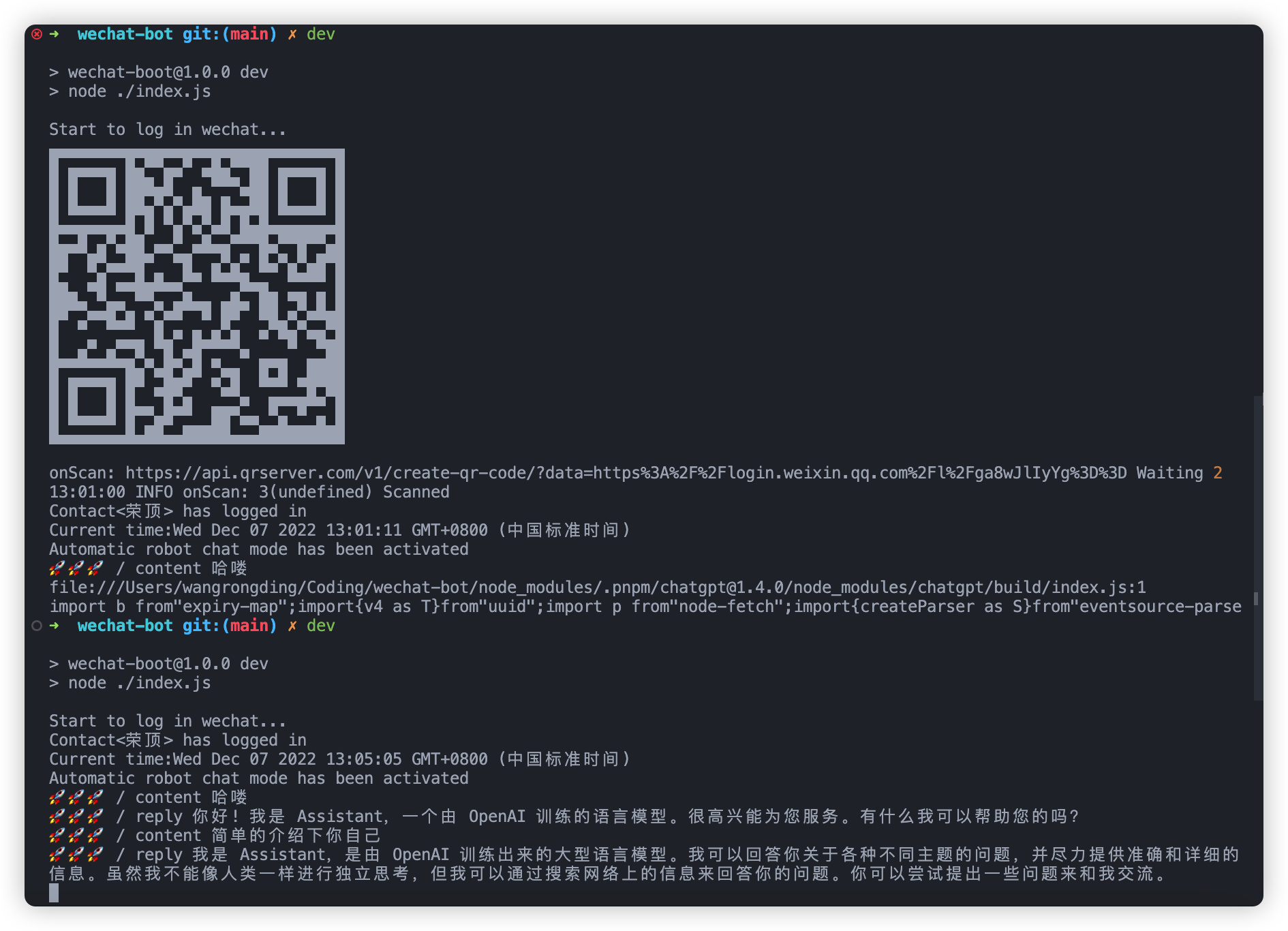 可以看到,自动回复都是基于 chatgpt 的,记得要开代理。 View on GitHub ↗
FAQ
Do I have to pay for or configure a model API?
wb wx ..., ordinary Lark operations, or --stats-only. Cloud-powered replies and deep analysis need the relevant key, balance, and network access; Ollama is available as a local service.Will it reply to every message after startup?
ALIAS_WHITELIST, and groups require both ROOM_WHITELIST membership and a BOT_NAME mention. Other channels also expose chat, user, prefix, or group-trigger controls.Is it safe to use with my primary WeChat account?
Does conversation analysis send messages to an external provider?
/stats and --stats-only read local JSONL only. /analyze and deep analysis with --serve send recent message samples to the active service or agent; local models or a local Pi configuration are preferable for private chats.